
 By Christopher Wright
In the repair industry, one thing is certain, the user is the greatest stress test of a system. With this in mind, it should be no surprise that user input can have some devastating effects to the functionality of a system.
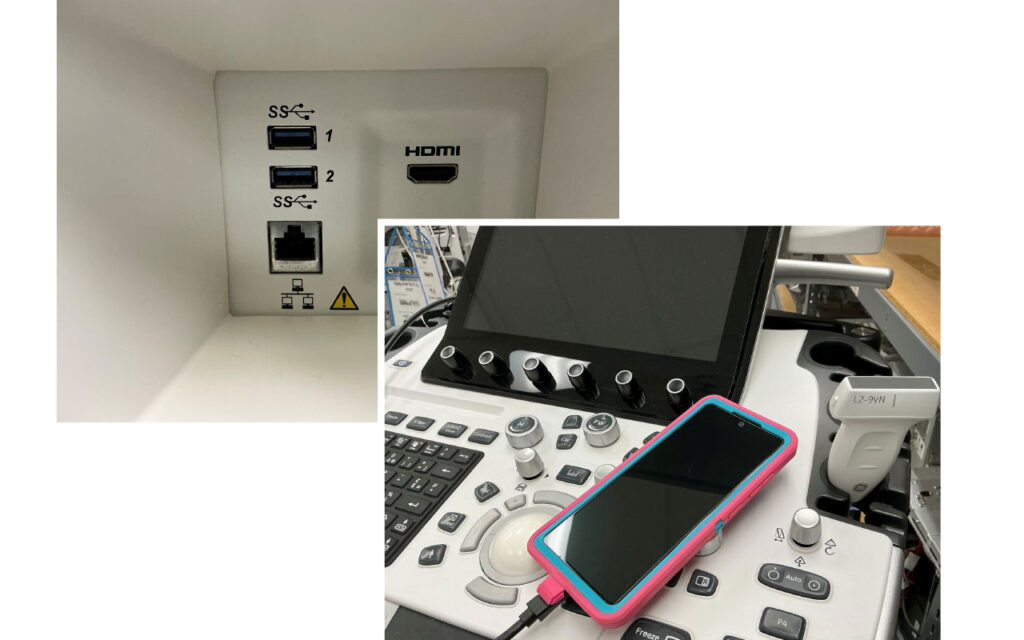
Let’s first discuss what qualifies as a user input on a medical device. The common ones we all think of are keyboards, trackball and USB. Any device, however, that can interface with the computer can be considered a user input. For instance, an HDMI port might only be perceived as an output for the system. This, however, is not the case. HDMI is an input/output (I/O) device and allows the system to interface with an external monitor or television and negotiate audio devices and display assignments. This query for information is a playground for problems. If the system identifies an external audio source, it can lose the default assignment. This is noticeable by the loss of audio from the primary speakers. A similar phenomenon can occur with the display assignment. This symptom manifests as improperly scaled resolution or a blank touchscreen. The typical method to resolve this issue, once it has occurred, is to reload software thus reinstating the default assignment. This can cost precious time and labor at best and may end with having to purchase software, loss of options, and rescheduled patients.
So, if these “I/Os” are so dangerous, why have them at all? I/Os allows the user to project their image onto another screen for others to view. It can allow for an external mouse to be plugged in if the trackball is not working. It gives the service technician the ability to export backups and load software. All these reasons make external I/Os an unfortunate necessity.
I/Os are also not exempt from the ever-present march of technology over time. I/Os used to be very simple in their approach and would not interface with any devices. This allowed them to be very stable and robust at the cost of data throughput. Many video interfaces would not carry audio and were limited to only a one-way signal.
The release of HDMI in 2002 and mass adoption into the medical field in the early 2010s did not account for the additional cross traffic that would occur. It was seen as a direct replacement for DVI and VGA instead of a different medium entirely. HDMI utilizes the extended display identification data (EDID) on a device in a process called handshaking. This handshake can grab the default assignment from the system if the EDID has a feature called Consumer Electronics Control (CEC). This gives the display the ability to change video and audio assignments at the manufacturers will. In addition to this, the large number of smart TVs flooding the market requires almost all new models to be hooked up to the Internet to function. This allows manufacturers to push updates and change settings after sale. One of these settings includes the CEC. This means your TV might be working fine with your system and as soon as they push an update, without warning, your system no longer plays audio or gives a main display. There are also several standards of HDMI that make older systems particularly unreliable when identifying a destination properly.
This issue is getting woven into more than just video output though. USB type A can also cause issues of its own. Let’s say a sonographer is trying to export a patient while the network is down, or a service technician is trying to grab a backup of the system during routine preventative maintenance. When they plug in a USB thumb drive, the system must interface with the device to determine the size, partition scheme, even the brand name. When this is done, the possibility exists for the device being misidentified, prompting OS level errors. These errors can be a nuisance or even prevent the application from loading entirely. Also, there is a common issue where any system that has software loaded via USB will halt when a non-OEM USB is plugged in during the boot process. USB type A can also be used with cellular devices. Phones can transmit data and audio over USB causing problems. Any sonographer looking to charge their phone off the USB port of the machine risks the whole operation. The addition of USB-C into newer systems, typically post 2016, also allows for video signals to be carried as well, causing a larger likelihood of loss of assignment.
How can we prevent these issues from biting us? Unfortunately, there is no catch all answer or patch disk that is going to fix these design flaws. Remember to be conscious of what devices are being plugged into the system and the risks inherent in doing so. Check to verify standard backups are made on systems in the event software does need to be reloaded. Make sure software is on hand for systems that have these outputs in use. If you do come across one of these symptoms, hopefully, this will help you diagnose the issue faster and get the system back up and running as soon as possible.
For more info, visit advancedultrasound.com.